AI Tools Guidance & Implementation

AI Tools That Help You Do Better Work

AI tools can help you write, analyse, create, organise, automate and communicate better. But most people start with the tool and then go looking for a use for it. Starting from the work is what makes the difference.

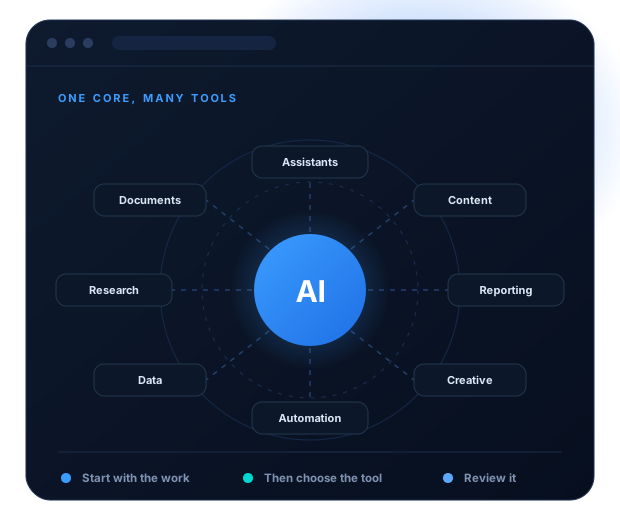
AI tools connected around a single core
The Challenge

Too many AI tools. Not enough clarity.

The problem is no longer access. Anyone can open a dozen AI tools this afternoon. The problem is deciding which one belongs in your work, and being able to say why.

More tools is not more capability. Without a decision about what each one is for, a longer list simply spreads the same work more thinly.

New tools every week

The list grows faster than anyone can realistically evaluate it.

Overlapping features

Three tools that each do seventy percent of the same job.

Free versus paid

No clear sense of what a subscription actually buys you.

Nobody owns the decision

Everyone picks their own, so nothing is shared or repeatable.

Trials that never end

Accounts accumulate quietly and none of them get adopted.

No way to compare

Reviews measure features, not the work you need done.

Why Tools Alone Fall Short

A tool alone does not create a better system.

Buying the tool is the easy part, and the part everyone does first. What changes the result is deciding how it will be used, by whom, and what happens to the output afterwards.

The tool is the smallest part. The method around it is what makes the output usable twice.

Choosing an AI tool after mapping the work
Our Approach

Start with the work. Then choose the AI tool.

Every recommendation we make starts from the same eight questions. Answer these and the shortlist writes itself; skip them and no amount of comparison helps.

Only then does the tool matter. And more often than people expect, the answer is one you are already paying for.

Tool Categories

Find the right AI tool for the job.

Seven categories cover almost everything people ask us about. Start from the category that matches your task, not from whichever tool was in the news this week.

AI Assistants for Everyday Work

General assistants for writing, thinking, summarising and answering questions across almost any subject.

AI Tools for Office Productivity

Tools that sit inside the documents, spreadsheets, email and meetings you already work in every day.

AI Tools for Marketing and Content

Producing and repurposing content at pace, without losing the voice that makes it recognisably yours.

AI Tools for Images, Design and Video

Visual production for people who are not designers, and faster iteration for the people who are.

AI Tools for Research and Discovery

Finding, reading and verifying sources faster, with citations you can actually follow back.

AI Tools for Data Analysis and Reporting

Turning spreadsheets and exports into answers, summaries and charts without rebuilding them by hand.

AI Tools for Automation and Agents

Where AI stops being something you open and becomes a step inside a process that runs on its own. This is the category with the most upside and the most need for controls, so it is the one we scope most carefully.

Role-based Recommendations

AI tools for your role and goal.

A starting point rather than a rule. The specific tool depends on your data, your budget and what your team already uses.

Role or team
Typical goal
Suitable tool type
Business owners
Typical goal

See the numbers without rebuilding them

Suitable tool type

Assistants + reporting tools

Sales and marketing
Typical goal

Produce more without sounding generic

Suitable tool type

Content + research tools

HR and recruitment
Typical goal

Screen and write faster, and fairly

Suitable tool type

Assistants + document tools

Finance and operations
Typical goal

Cut manual re-entry and reconciliation

Suitable tool type

Spreadsheet + automation tools

Content creators
Typical goal

Ship more without losing the voice

Suitable tool type

Creative + video tools

Students and researchers
Typical goal

Find and verify sources properly

Suitable tool type

Research + citation tools

Support and service
Typical goal

Answer faster with a consistent tone

Suitable tool type

Assistants + workflow tools

Better Together

AI tools work best in combination.

Almost nobody needs one tool. They need two or three that hand work to each other, with a person checking the result at the end.

Assistant + document tool

Draft in one, finish where the file already lives.

Research + assistant

Sourced facts first, then the writing on top of them.

Spreadsheet + reporting

The analysis and the summary produced in one pass.

Creative + brand templates

Speed, without drifting away from the brand.

Assistant + automation

The step runs whether or not anyone remembers it.

Any tool + a review step

The combination that matters more than the rest.

Responsible Use

Use AI responsibly: Ask, Check, Approve, Improve.

A four-step habit that takes seconds and prevents most of the problems people attribute to the tools themselves.

01

Ask with context

Role, constraints, audience and format. A vague prompt earns a vague answer.

02

Check the output

Verify facts, figures and names. AI is equally confident when it is wrong.

03

Approve before use

A named person signs off anything that leaves the business.

04

Improve the prompt

Save what worked, so the next run starts further ahead than the last.

Before You Subscribe

Questions worth asking before you adopt a tool.

Six questions that take ten minutes and routinely save a year of paying for something nobody opens.

What task does this replace?

If the answer is vague, so is the value.

Who else needs to use it?

One licence is a habit. Ten is a decision.

Where does our data go?

Read the policy before the trial, not after it.

What if the tool changes?

Pricing and features move. Plan for that.

Can we do this already?

Often the tool you own does ninety percent of it.

How will we know it worked?

Agree the measure before the subscription starts.

How It Works

How we help you adopt AI tools.

Six stages, each with an agreed outcome, so you always know what is happening now and what happens next.

01

Requirement Discussion

We start with the work you want to improve, and what a better result would actually look like for you.

02

Use Case Selection

We pick the two or three tasks where AI will make a visible difference, and set the rest aside for now.

03

Tool and Workflow Recommendation

A shortlist matched to those tasks, your data constraints and your budget — including the free options.

04

Setup and Configuration

Accounts, access, prompt libraries, templates and any integrations configured and tested on real work.

05

Practical Training

Your team learns on their own tasks during the session, not on sample exercises they will never repeat.

06

Review and Improvement

A follow-up to see what stuck, what did not, and what should change now that it is in daily use.

Frequently Asked

Clear answers about choosing and using AI tools.

The questions we are asked most often, answered directly. If yours is not listed, ask us and you will get a straight answer.

Still have questions?

That depends entirely on the work. For most people a general assistant covers the majority of daily tasks, and specialist tools only earn their place once a specific, repeated need is clear. We would rather recommend one tool you use than five you do not.

Not to begin with. Free tiers are enough to establish whether a tool fits your work. We point out where a paid plan genuinely changes what is possible — longer context, better models, team features — so the decision is yours to make with the facts.

It varies by tool and by plan, and the difference matters. We go through the data-handling terms of whatever we recommend, flag what should never be pasted into a general tool, and use self-hosted or enterprise options where the sensitivity requires it.

No, and framing it that way tends to produce bad decisions. AI removes drafting, formatting, summarising and re-entry. Judgement, relationships, accountability and knowing when the output is wrong all stay firmly with people.

Useful, but not reliable without checking. They are confident regardless of whether they are correct, which is precisely the risk. Every workflow we set up includes a verification step, and we teach what to check rather than assuming it is fine.

No. We have no reseller arrangements and no commission on any platform, which is deliberate. It means we can recommend the free option, or tell you the tool you already pay for is sufficient, without it costing us anything.

A single tool used well takes a session plus two or three weeks of practice. Team-wide adoption with shared prompts and standards usually runs four to eight weeks, because the habit takes longer to build than the setup does.

Yes. Sessions run by role rather than by tool, so a finance team and a marketing team learn different examples on the same underlying method. Everyone leaves with prompts and templates for their own work.

It will, and that is normal. We build workflows in steps that can be swapped, and document the process independently of the tool, so a pricing change or a feature removal means replacing one component instead of starting over.

Both. Sessions can run in either language or a mix. Written materials, prompt libraries and documentation are provided in English, since that is what the tools themselves respond to most reliably.

Start with one task, not one tool

Turn AI tools into practical capability.

Tell us the task you want to do faster or better. We will recommend the tool, set it up with you, and make sure your team can actually use it — with no obligation.

© 2026 Abilix AI & Digital Solutions