Practical AI Prompts for Real Work

Prompts That Help You Get Better Results From AI

AI can save time, improve ideas and support daily work — but only when it understands what you need. A clear prompt gives it the right context, task, format and tone.

The Abilix Prompt Library gives business owners, professionals, teams, students and creators a practical starting point for real tasks. Use them as they are, then adapt the details to your own work.

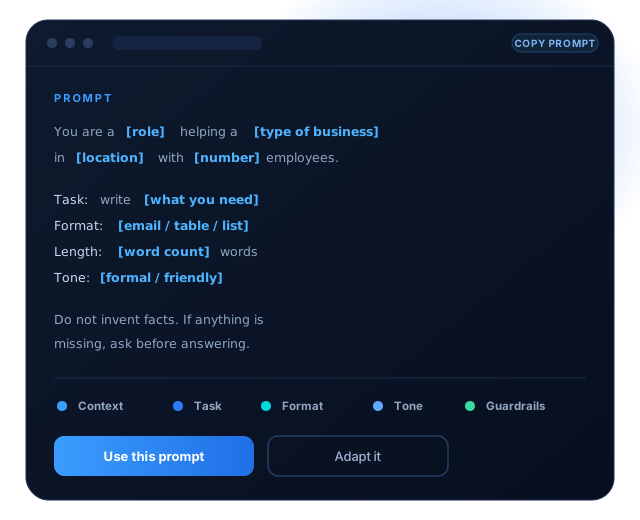
Prompt editor preview
Find a prompt for your task

Copy, adapt and improve.

Replace the bracketed text with your details. Everything else is already written and useful, so add or trim as the situation needs.

01

Business and Strategy

Plan, price, compare options and think a decision through before committing money to it.

You are a business consultant advising a [type of business] in [location] with [number] employees.


Identify the three biggest risks to profitability over the next [time period]. For each one, give the cause, the likely impact, and one practical action to reduce it.


Ask me any question you need before answering.

02

Marketing and Content

Plan campaigns, write copy and repurpose posts while keeping one recognisable voice.

Act as a marketing strategist for [business or product]. The customers are [audience description].


Write a [platform] post explaining [topic or offer]. Keep it under [word count] words, use a [tone] tone, and end with one clear call to action.


Give me three versions: one direct, one story-led, one question-led.

03

Office Work and Communication

Draft emails, summarise meetings and answer difficult messages without starting from a blank page.

Rewrite the email below so it is clear, polite and under [word count] words.


Audience: [who will read it]

Goal: [what you want to happen]

Tone: [formal / friendly / firm]


Keep every fact. Do not invent details.


Email: [paste your draft here]

04

WhatsApp Customer Replies

Answer enquiries quickly with replies that stay consistent, professional and recognisably yours.

Write a short WhatsApp reply to a customer who asked: “[paste the question]“.


Business: [what you do]

Facts to include: [the details you want mentioned]

Tone: warm, professional, no jargon


Keep it under [number] words and end with one question that moves the conversation forward.

05

Data, Reports and Spreadsheets

Turn exports and raw numbers into formulas, summaries and charts you can hand to somebody else.

My spreadsheet has these columns: [list your columns].


1. Give me the formula for [what you want to calculate].

2. Explain what it does in one sentence.

3. Tell me what would make it return an error.


Assume [Excel / Google Sheets] and that the data starts in row 2.

06

Learning and Career

Study a subject, prepare for an interview and explain your own experience clearly.

Explain [topic] to someone with [current level] knowledge.


Use plain language, one worked example, and a short summary at the end. Then give me three questions that test whether I understood it.


Do not use analogies that need prior technical knowledge.

07

Image and Video Creation

Describe a visual precisely enough that the result is usable rather than merely interesting.

Create an image prompt for [subject].


Style: [photographic / illustration / 3D]

Setting: [where it takes place]

Lighting: [describe the light]

Mood: [describe the feeling]

Aspect ratio: [16:9 / 1:1 / 9:16]


Avoid: text in the image, distorted hands, cluttered background.

08

Automation and AI Assistants

Define what an assistant must do, what it must refuse, and how it should behave when unsure.

You are an assistant for [business]. Your job is to [main task].


Always: [rules to follow]

Never: [things to refuse]

If you are unsure: say so and ask for [what you need].


Reply in [format]. Keep answers under [length].

What a good prompt includes

Better context produces more useful output.

A short prompt is not a fast prompt. The seconds spent describing the job properly are returned several times over in output you do not have to rewrite.

You do not need a complicated prompt every time. Start with the task, add useful details, review the output and improve it with a follow-up question.

Who the AI should act as

A role sets the vocabulary and the level of detail.

Who the output is for

Writing for a client and for a colleague are not the same job.

The task, stated once

One clear job beats three vague ones every time.

The format you need

Email, table, bullet list, script or spreadsheet formula.

Length and tone

Say the word count. Say how it should sound.

Facts it must use

Give it the details rather than hoping it guesses them.

What to avoid

Naming the failure prevents most of it happening.

What to do when unsure

Tell it to ask you instead of inventing an answer.

A simple prompt framework

Five parts, in the same order, every time.

The structure matters more than the wording. Once these five parts are habit, writing a good prompt takes about as long as writing a bad one.

01

Context

Who it is, who it is for, and the situation.

02

Length and layout

Word count and the shape of the output.

03

Expected task

The one job, stated in a single sentence.

04

Accuracy rules

What it must not invent or assume.

05

Result and revision

What good looks like, and how to fix it.

Example framework

Context: You are a [role] writing for [audience] at a [type of business].


Task: [the one thing you want done].


Format: [email / table / list]. Length: [word count] words. Tone: [tone].


Accuracy: use only the facts below. Do not invent names, figures or dates. If something is missing, ask.


Facts: [paste the details].


When done: give me one alternative version and tell me what you would change to improve it.

Use it responsibly

Prompts help you. You still have to check.

A good prompt improves the odds. It does not make the output true. The habit of checking is what separates useful AI work from embarrassing AI work.

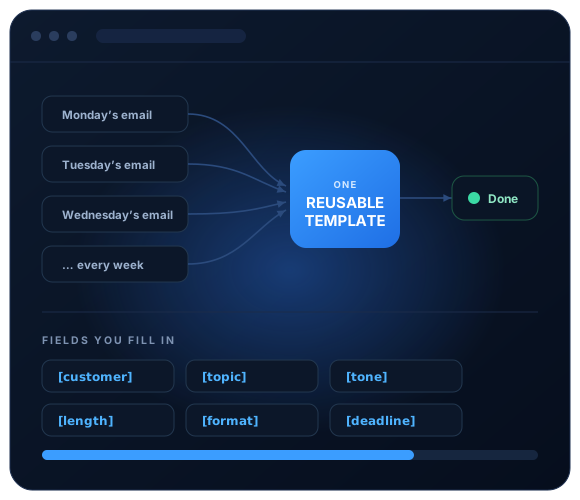
A repeated task turned into a reusable prompt template
Custom prompts for your business

Turn repeated work into reusable prompt templates.

If your team repeatedly writes quotations, replies or enquiries, creates reports, prepares social content or summarises meetings, a tailored template can make the work faster and more consistent.

Frequently asked questions

Clear answers about prompts and AI output.

The questions we are asked most often, answered directly. If yours is not listed, ask us and you will get a straight answer.

Still have questions?

The instruction you give an AI tool. A weak prompt names a topic; a good one gives the role, the task, the format, the length, the tone and the facts to use. Most disappointing AI output traces back to a prompt that left the tool guessing.

Yes. Everything here is plain language with no tool-specific syntax, so the same prompt works across the major assistants. Results will vary slightly between them, which is worth testing when a task matters.

No. If you can describe the job to a new colleague, you can write a good prompt. The bracketed fields tell you exactly what to replace, and everything else is already written for you.

Yes. We map the tasks your team repeats, write prompts in your own terminology, add the guardrails your work needs, and run a short session so people can adapt them without breaking them.

Useful, but not reliable without checking. These tools are equally confident whether or not they are correct, so every prompt here ends with an instruction to ask rather than invent — and a person should still verify anything that leaves the business.

Yes. Prompts and output can both be in Malayalam, though results are generally strongest when the prompt is written in English and the output requested in Malayalam. We test both ways for the tasks that matter to you.

Yes. Sessions run by role rather than by tool, using your own work as the exercises, so people leave with prompts they will actually reuse the following week rather than notes they will not.

Make a prompt for your real work

Turn a repeated task into a clear, reusable prompt.

Tell Abilix what you do repeatedly, and we will help you turn it into a prompt your whole team can reuse — or train them to write their own.

© 2026 Abilix AI & Digital Solutions